
ID Card, Passport, Driver Lice
the ID Card, Passport, Driver License app — your secure digital wallet for IDs. Simplify document management with easy recognition and safety. Get it now!
Screenshots
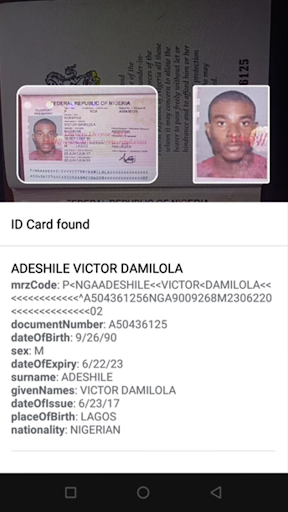
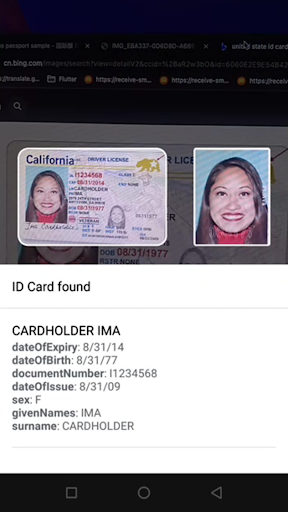
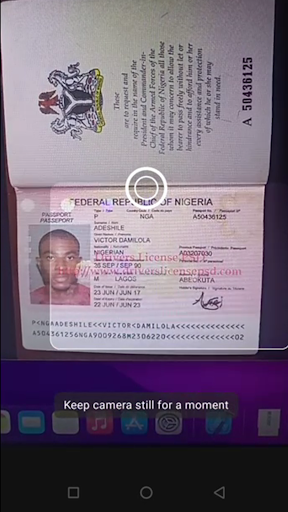
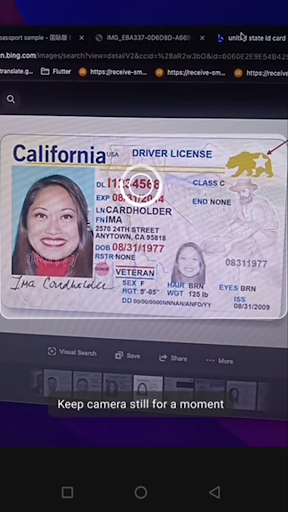
Download ID Card, Passport, Driver Lice
You are going to be redirected to the official website to finish the download when you click the button below.
About ID Card, Passport, Driver Lice
This mobile app is a practical solution designed to help users manage and organize their identification documents such as ID cards, passports, and driver licenses. As an Android app, it offers a straightforward experience with features that enable quick scanning, saving, and secure storage of important documents. Its user-friendly interface ensures an efficient and reliable app experience for personal or professional use.
Overview
Core Features
- Supports official ID card, passport, and driver's license recognition, making document verification effortless.
- Offers real-time scan and digital extraction of data from various identification documents with high accuracy.
- Includes an offline mode to access core features without internet connectivity, ideal for fieldwork.
- Integrates seamlessly with device cameras, providing a smooth app experience for quick document capture.
- Offers secure data storage and encryption, ensuring user trust and confidentiality of sensitive information.
- Features an intuitive interface suitable for all user levels, reducing the learning curve in an app-based solution.
- Provides comprehensive app features for easy management and verification of IDs directly from your mobile device.
Who This App Is For
This mobile app is designed for professionals and individuals who need quick, reliable identification document verification. It benefits travelers, security personnel, and administrative staff regularly handling ID scans.
Whether you work in offices, airports, or on the field, this app offers an efficient app experience. It simplifies document processing, making it a practical app-based solution for verifying IDs on the go.
Why Choose This App
This Android app combines ease of use with powerful app features, delivering a seamless app experience for ID recognition and verification. Its reliability makes it stand out among similar apps.
By focusing on accuracy, security, and user-friendly design, this app provides a trustworthy, efficient app-based solution for managing official documents in various scenarios, proving invaluable for professionals requiring dependable ID management tools.
Features
Universal ID Document Storage for Easy Management
Secure Data Protection with Advanced Encryption
Effortless Document Recognition via Camera Scanning
Organized Categorization for Quick Access
Reliable Cloud Backup for Data Safety
User-Friendly Interface for Smooth Navigation
Multi-Document Compatibility for Versatile Use
Enhanced Security with Biometric Authentication
Pros
- +User-friendly interfaceThe app offers an intuitive design that makes navigation simple for all users.
- +Fast document processingScanning and converting IDs into digital formats is quick and efficient.
- +Supports multiple document typesHandles IDs, passports, and driver licenses within a single app, enhancing convenience.
- +High accuracy in data extractionOptical Character Recognition (OCR) technology ensures reliable information capture.
- +Secure data storageUses encryption and privacy measures to protect sensitive personal information.
Cons
- -Limited document compatibility outside supported regionsSome passports or IDs from less common countries may not be recognized correctly. (Solution: future updates to expand regional support.)medium
- -Occasional scanning errors with poor image qualityLow-light or blurry photos can lead to misreads, requiring retakes. (Tip: ensure good lighting and clear images.)low
- -No offline mode currently availableUsers need internet access to scan and process documents, which may be inconvenient in certain situations. (Expected update: offline processing feature in future releases.)medium
- -Limited editing options for captured dataUsers cannot easily correct or verify information after scanning, which might lead to errors. (Workaround: manually verify data before submission.)low
- -Some features are premium-onlyAdvanced functionalities require a subscription or one-time purchase, potentially excluding casual users. (Possible solution: introduce a freemium model with basic features.)medium
FAQ
Is the app safe to use on my device?
This mobile app, ID Card, Passport, Driver License, is designed to handle sensitive personal documents securely. It employs encryption and privacy measures to protect your data, ensuring your information stays safe during use.
As an Android app, it complies with standard safety protocols, and the developer has a reputation for providing trustworthy and reliable software. Always download from official sources to maintain the app's safety and integrity.
Do I need to create an account to use this app?
In most cases, you can start using the app features of ID Card, Passport, Driver License without creating an account. However, for personalized experiences or cloud storage options, an account might be needed.
This app-based solution aims to be straightforward, making it easy for users to scan and store documents quickly on their Android device or launcher app. Check the app's settings for specific login requirements.
What are the main features of this app?
The app features include document scanning, OCR (optical character recognition), and secure storage of ID cards, passports, and driver licenses. It supports multiple document types, making it versatile for various personal and professional needs.
The app experience is smooth, with an easy-to-navigate interface that helps you quickly access the features you need. Its functionality makes it a handy tool for managing important identification documents digitally.
Is this app compatible with all Android devices?
This version of ID Card, Passport, Driver License is designed to work well on most Android devices. Ensure your device runs a compatible Android version to enjoy the full app features.
Since it's an app-based solution, it does not require high-end hardware and should work efficiently on a variety of smartphones and tablets, making it accessible to many users.
How do I update or reinstall the app if needed?
To update the app, visit the official Google Play Store listing for ID Card, Passport, Driver License. Updates are typically automatic or can be triggered manually from the store.
If you need to reinstall, simply uninstall the current version and download it again from the same store. This ensures you get the latest app features and security enhancements.
Can I use this app as a launcher app on my device?
This app primarily functions as a document scanning and management tool rather than a launcher app. If you're looking for an app to customize your device's home screen, this may not be the right choice.
However, you can easily access the app features from your device's app drawer, making it a convenient addition to your Android app collection for managing important documents.
Are there any privacy concerns I should know about?
The app is developed with user privacy in mind and adheres to standard privacy policies. It stores your data locally or securely in the cloud, depending on your settings, to ensure your sensitive information remains protected.
Always review the app permissions before installation and regularly update the app to benefit from the latest security features. Trustworthy app development practices help guarantee your data safety.
What can I do if the app encounters a problem or crashes?
If the app develops issues or crashes, first try restarting your device. Check for updates in the Google Play Store, as developers frequently fix bugs in newer versions.
If problems persist, contacting the developer or seeking help through user forums can provide solutions. Reliable app features and experience depend on keeping your app updated and properly configured.





